How to produce a board pack from NetSuite
On this page
The short answer. NetSuite produces the numbers natively: statements in Financial Report Builder, budget against actual, consolidation across subsidiaries, and any cut by subsidiary, department, class or location in saved searches and SuiteAnalytics Workbooks. What it leaves to people is finding the cause of each movement and writing what it means for the board. Lock the period, run one fixed set of reports, cut every material variance by segment until it lands on a single driver, then write four sentences per variance: what happened, why, what it changes and what to do.
NetSuite is often the system a business moves to when it outgrows Xero, QuickBooks or Sage: several subsidiaries, more than one currency, inventory, and a board that expects a proper pack every month. The ledger gets better. The pack often does not, because the work of turning NetSuite's reports into an argument still happens in spreadsheets. This guide covers what NetSuite does natively, a monthly routine for the pack, the tools that sit on top of it, and how to write the commentary.
What NetSuite does natively
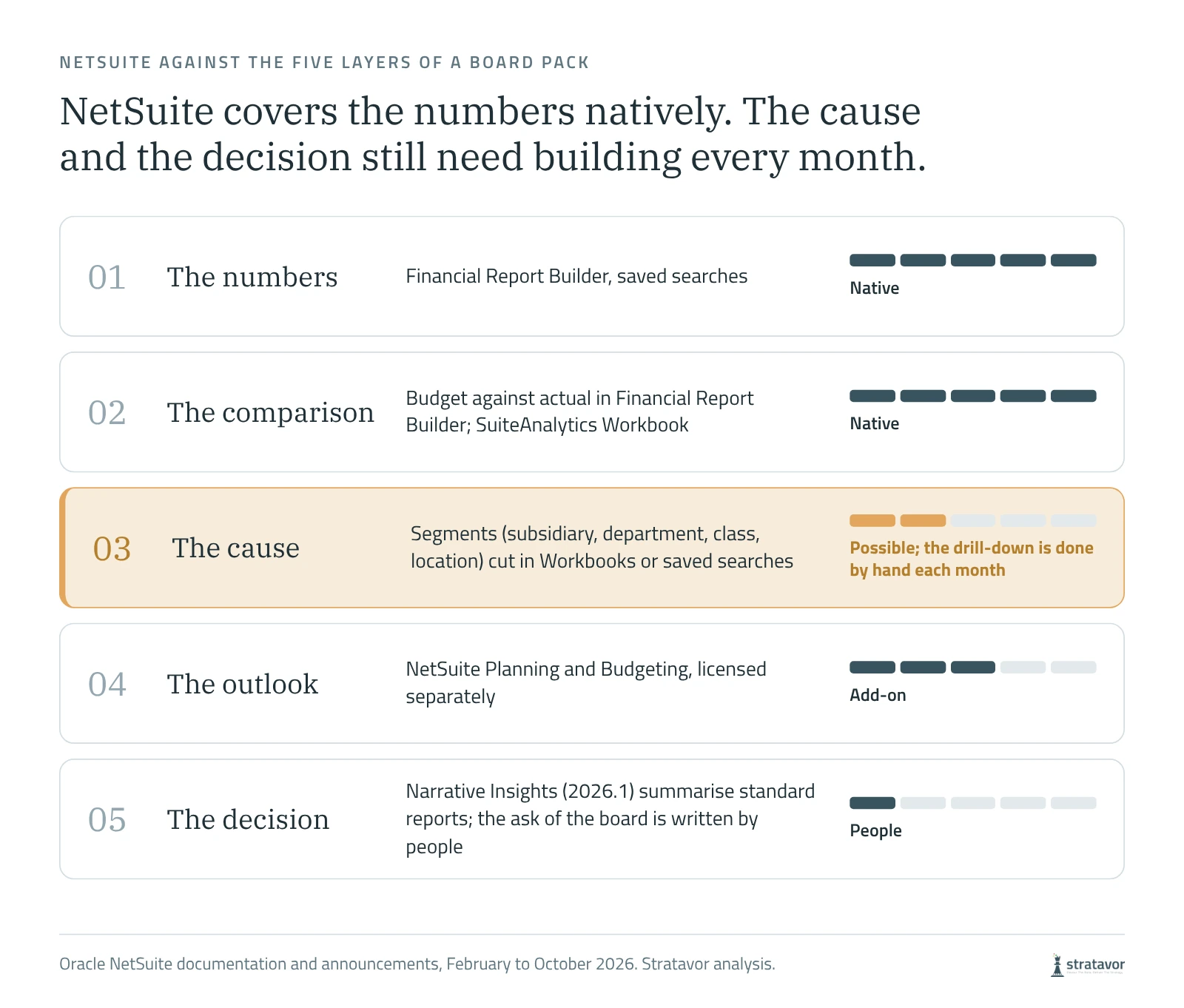
NetSuite covers more of the pack than many finance teams use. Financial Report Builder lays out the income statement, balance sheet and cash flow statement in your own format. Budget against actual is a standard report. Saved searches and SuiteAnalytics Workbook cut any transaction by subsidiary, department, class, location or custom segment. OneWorld accounts consolidate subsidiaries across currencies, with intercompany eliminations.
Two further products are licensed separately. NetSuite Planning and Budgeting adds budgets, forecasts and scenarios. NetSuite Data Intelligence, the new name given to NetSuite Analytics Warehouse at SuiteWorld in October 2026, adds multi-year history and blends NetSuite with data from other systems.
In February 2026 Oracle announced AI-generated narratives for key financial reports, and they arrived in the 2026.1 release as Narrative Insights: one click writes a summary of a report, which may surface trends, anomalies and risks. Oracle's documentation is clear about the limits. It works on a limited set of standard reports, including the income statement, balance sheet, cash flow statement, trial balance and budget against actual, and not on customised reports. The summary can differ each time it is generated, and Oracle advises checking it against the underlying reports before use. A pack built on customised Financial Report Builder layouts falls outside that scope, so in practice the summaries help the finance team read standard reports faster, and the pack's commentary is still written by hand.
A monthly routine for the pack
- Close and lock the period. Work through the period close checklist and lock the period before anything is reported, so the figures cannot move after the pack goes out.
- Run one fixed set of reports. Save the pack's layouts in Financial Report Builder, consolidated and by subsidiary, and run the same set every month.
- Compare with budget and last year. Load budgets by the same subsidiaries, departments and classes you report by. A budget held at company level cannot explain a departmental variance.
- Set a materiality threshold. Comment on every variance above a set amount or percentage, and say nothing about the rest.
- Cut every material variance by segment. Class, then location, then department, then customer or item, until one driver explains most of it.
- Write four sentences per variance. What happened, why, what it changes and what to do. Our board commentary template sets out the standard.
- Put the asks on page one. The decisions the board is asked to make, with the options, come before any statement.
Find the cause with segments
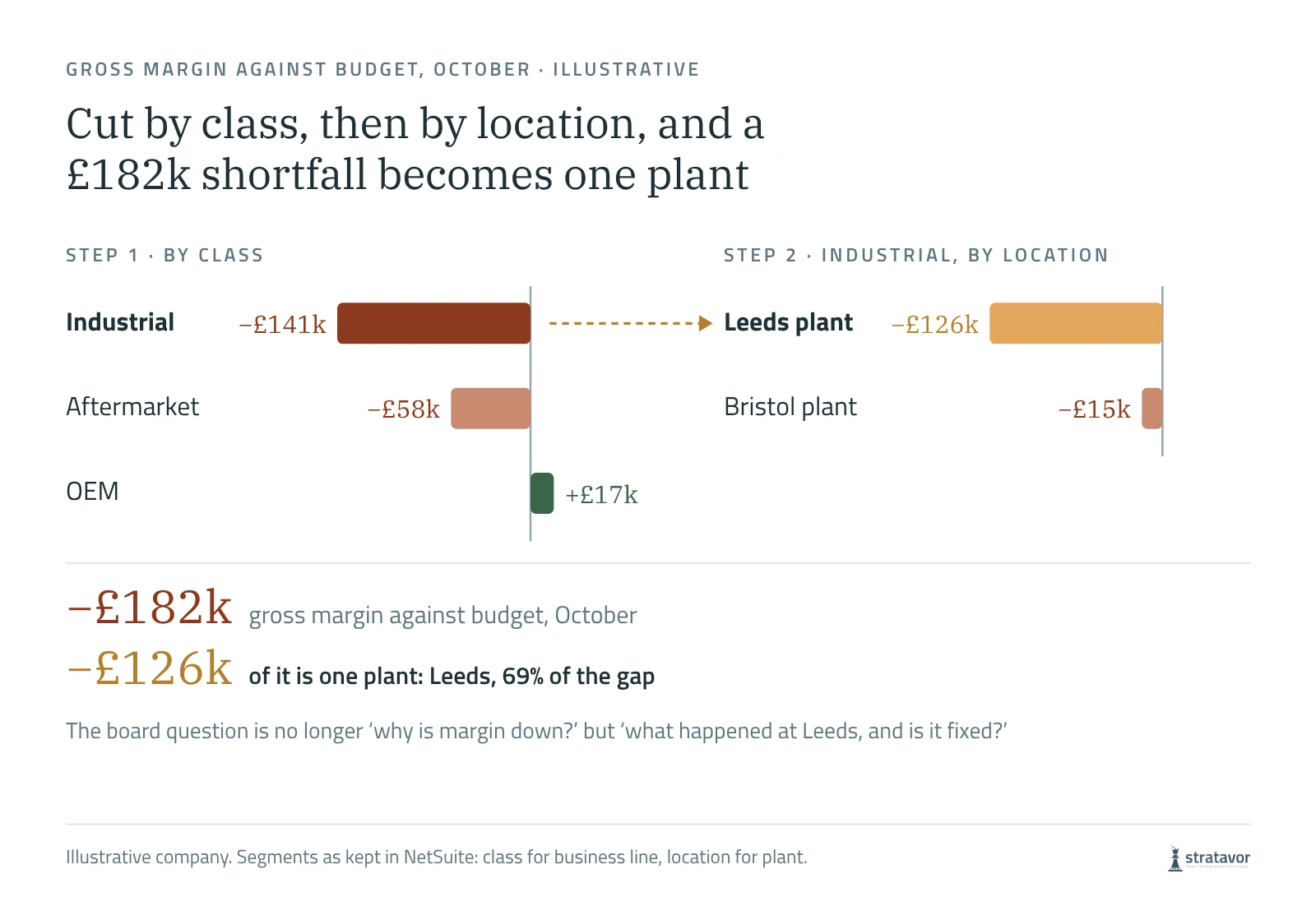
Segments are where NetSuite earns its place in a board pack, and most of the analysis a board needs is already in them. In the illustrative company, October gross margin is £182,000 below budget. Cut by class, two business lines are behind and one is ahead, and Industrial accounts for £141,000. Cut Industrial by location and the Leeds plant accounts for £126,000 on its own, 69% of the whole gap. The board no longer needs to ask why margin is down. It needs to ask what happened at Leeds, and whether it is fixed.
The cut itself takes minutes in a Workbook. What takes the time is doing it for every material variance, every month, choosing the right sequence of segments, and then writing up what it found. That is the step most packs skip, which is why so much commentary describes movements rather than explaining them: gross margin was below budget due to lower margins in the industrial business.
Tools that sit on NetSuite for board reporting
| Tool | What it adds | Suits |
|---|---|---|
| Financial Report Builder, saved searches, SuiteAnalytics Workbook | Statements, budget against actual and segment cuts inside NetSuite | Teams with time to build and maintain their own layouts |
| Narrative Insights, NetSuite 2026.1 | One-click AI summaries of a limited set of standard reports | Reading standard reports faster; not supported on customised reports |
| NetSuite Planning and Budgeting | Budgets, forecasts and scenarios, licensed separately | The outlook section of the pack |
| NetSuite Data Intelligence | Multi-year history and data blended from other systems, licensed separately | Analysis across NetSuite and other sources |
| Zone & Co: Solution 7 and ZoneReporting | Live NetSuite data in Excel; prebuilt Power BI reports | Packs built in Excel or Power BI |
| Jet Reports, from insightsoftware | Excel reporting on NetSuite data | Excel-based packs |
| Datarails, Vena, Planful | Planning, consolidation and reporting suites with NetSuite connectivity | A full FP&A cycle across several systems |
| Stratavor | Commentary on each material movement that names the cause and frames the board's question, from figures computed in code | The written analysis and the pack itself |
Which to choose depends on where the pack is built and where the time goes. If the bottleneck is getting NetSuite data into a familiar format, an Excel or Power BI layer solves it. If it is planning, an FP&A suite. If the numbers are ready by day two and the commentary is still being written on day five, the gap is the analysis, and that is the part Stratavor is built for. Our guide to board reporting software covers the wider market.
Groups and subsidiaries
For a OneWorld group, report the consolidated position first and each subsidiary second, in the same layout, and comment on the subsidiaries that moved the group rather than on every entity. Check that intercompany balances eliminate before the pack goes out. A consolidated figure that does not reconcile to the subsidiary figures behind it loses the board's trust faster than any variance.
Where Stratavor fits
Stratavor connects directly to NetSuite, as well as Xero, QuickBooks Online, Sage and Deltek Vantagepoint, with HubSpot for customer and pipeline context. It reads the segments you already keep (subsidiary, department, class and location), computes every figure from the ledger in code, and writes commentary on each material movement that names its cause and frames the question for the board. Language models only write the explanation around figures that have already been computed and checked, so the same ledger gives the same numbers every time. It reports across groups as well as single companies, and the Power BI add-on carries the same figures and commentary into Power BI.
Stratavor is not a forecasting tool; pair it with NetSuite Planning and Budgeting or an FP&A suite for the outlook. See the integrations or talk to us about a NetSuite pack.
Sources
Checked on 7 November 2026.
- Oracle NetSuite: Narrative Insights overview
- CPA Practice Advisor: NetSuite announces AI innovations, 11 February 2026
- Zone & Co: the 13 best NetSuite reporting tools, 29 October 2026
- BrokenRubik: SuiteWorld 2026 announcements
- Versich: NetSuite Data Intelligence
Microsoft and Power BI are trademarks of the Microsoft group of companies.
Frequently asked questions
How do I produce a board pack from NetSuite?
Close and lock the period, run a fixed set of Financial Report Builder layouts, consolidated and by subsidiary, against budget and last year, cut every material variance by segment until it lands on one driver, and write four sentences per variance: what happened, why, what it changes and what to do. Put the board's decisions on page one.
Can NetSuite write commentary on financial reports?
Partly. Narrative Insights, in the 2026.1 release, writes one-click AI summaries of a limited set of standard reports, including the income statement, balance sheet and budget against actual. It is not supported on customised reports, the summary can differ each time, and Oracle advises checking it before use. Commentary that names the cause of each movement and frames the board's decision is still written by people, or drafted by a tool built for it, such as Stratavor.
What is the best reporting tool for NetSuite?
It depends on where the pack is built. For Excel, Solution 7 or Jet Reports; for Power BI, ZoneReporting; for a full planning cycle, an FP&A suite such as Datarails, Vena or Planful. For the written analysis, Stratavor connects directly to NetSuite and drafts the commentary from figures computed in code.
How do I explain a variance in NetSuite?
Cut it by segment in sequence (class, then location, then department, then customer or item) until one driver explains most of it. Then write four sentences: what happened, why, what it changes and what to do. A variance that has not been cut has been described, not explained.
Does NetSuite consolidate subsidiaries for a group board pack?
Yes. NetSuite OneWorld consolidates subsidiaries across currencies, with intercompany eliminations. Report the consolidated position first and each subsidiary second, in the same layout, and comment on the subsidiaries that moved the group.
Does Stratavor work with NetSuite?
Yes. Stratavor connects directly to NetSuite, reads the segments you already keep, computes every figure from the ledger and writes the commentary for the board pack, for single companies and across groups. It also connects to Xero, QuickBooks Online, Sage, Deltek Vantagepoint and HubSpot.
The Stratavor digest
One email a month. Worth opening.
Decoded films on real companies' results, short films on how businesses make and lose money, and guides on customers, competitors, risk, cash and the board pack. No sales emails.
By subscribing you agree to receive the monthly Stratavor digest. Unsubscribe at any time from any email. Privacy policy.